The standard way to work with multithreading and asynchronous code in Kotlin is to use the kotlinx.coroutines library.
To make code execution easier to manage, the library provides several standard dispatchers:
Dispatchers.Main— for working on the UI thread, if the platform has one.Dispatchers.Default— for CPU-intensive work, such as calculations and data processing. Used by default when no dispatcher is specified.Dispatchers.IO— for blocking I/O operations, such as file operations or blocking network calls.Dispatchers.Unconfined— starts a coroutine on the current thread until its first suspension. After that, the coroutine may resume on a thread chosen by the suspending operation.
In Compose Multiplatform apps, application code usually starts running on Dispatchers.Main. So all blocking and heavy operations need to move to other threads to avoid blocking the UI.
The standard approach here is to move all blocking file system or network calls to Dispatchers.IO, and heavy computation to Dispatchers.Default.
One important point: dispatchers do not have to use actual additional threads. Even a single thread used to render the UI is fast enough that, after rendering, it usually sits idle until it needs to render the next frame. In these cases, it is more accurate to talk about multitasking on a single thread rather than multithreading.
Keeping frames on time #
Still, the UI should stay just as smooth and fast as it would be without the extra load. To make that happen, we need to keep a few things in mind.
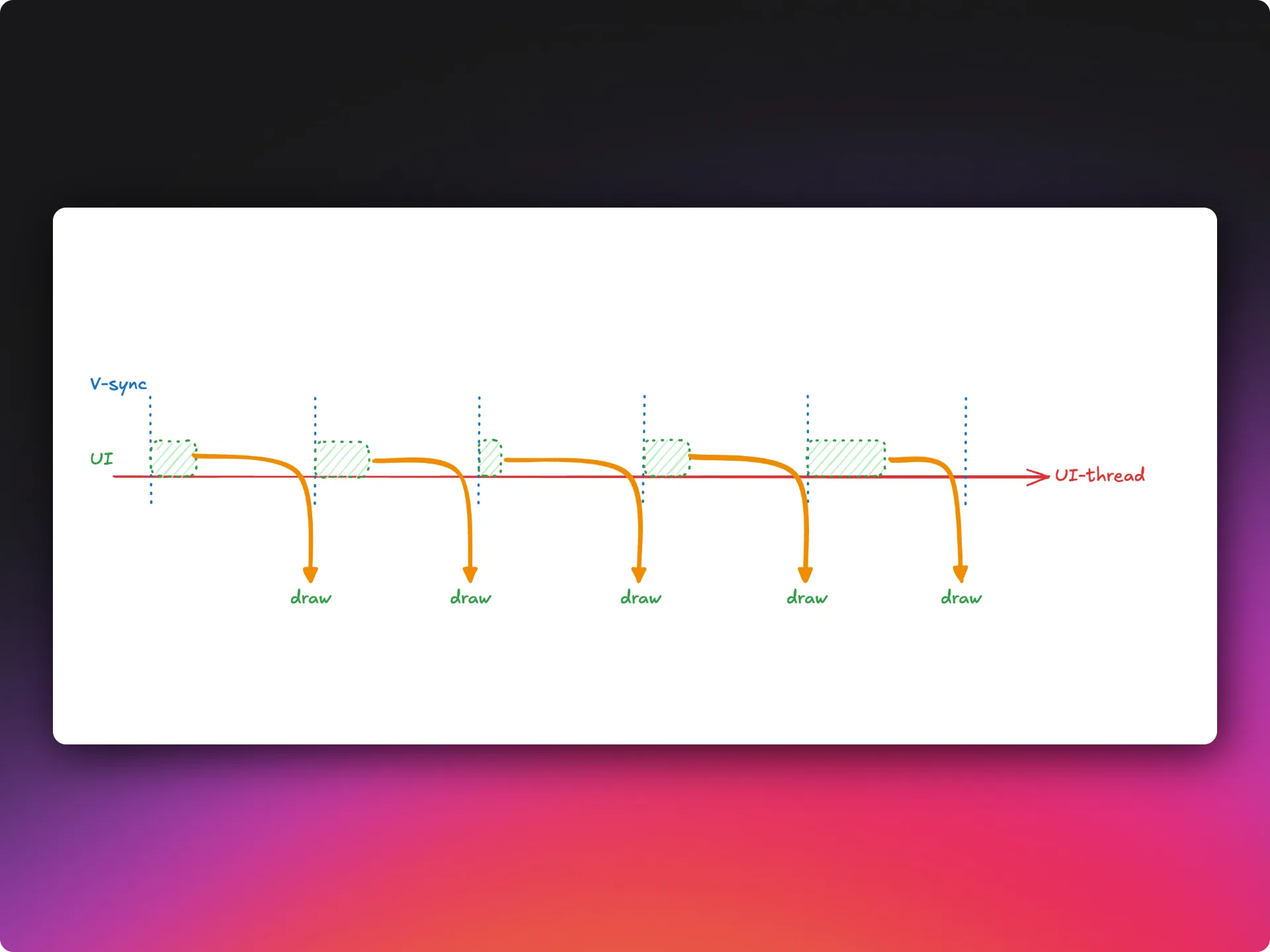
First, frames must be ready to display within the deadlines set by the refresh rate. The system usually controls this rate, and the synchronization points are known as VSync ticks.
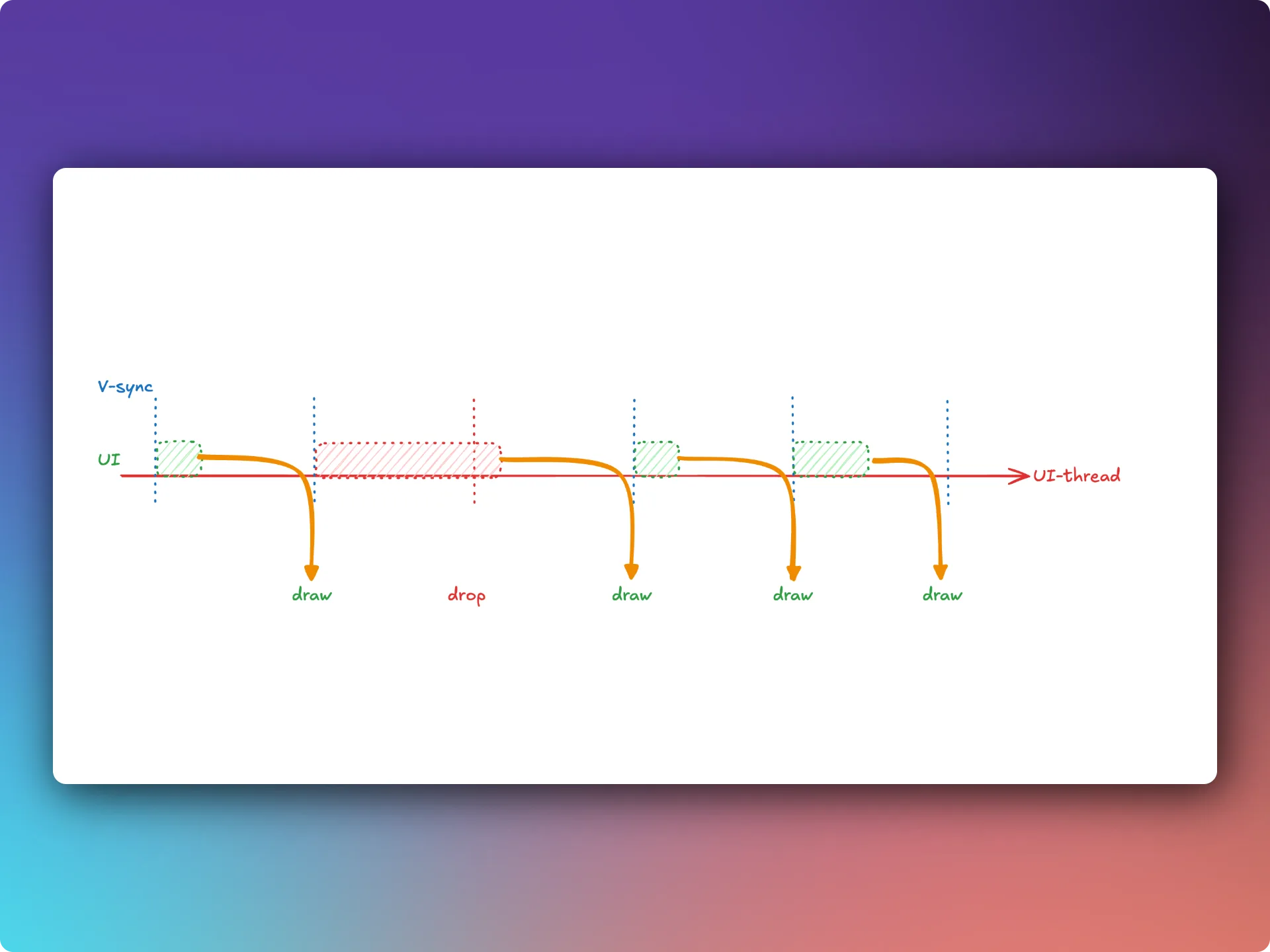
If, for some reason, the previous frame is not ready to display by the next tick, the next frame will be dropped. And users are quite likely to notice.
In Compose, this happens very rarely thanks to its internal optimizations.
Web specific #
The kotlinx.coroutines library is multiplatform. It works on Android, on the JVM in desktop apps, on iOS, and in the browser. But unlike the other platforms, the browser does not have an equivalent threading model where code can run in parallel with access to shared memory. This is why, if your project has a web target, you will find two important differences:
Dispatchers.IOis not available from common code.Dispatchers.Defaultruns its tasks on the same UI thread as the user interface.
A practical example: blurred image previews #
To better understand how this works, let’s look at a practical example.
Suppose our app needs to display images. As you can imagine, the images themselves can take quite a while to load. So someone came up with a neat idea: along with the image URL, the server response includes a small byte array that can be decoded into a blurred preview of the image.
This means that, while we are slowly loading the image from the network, we can already show the user something more interesting than a plain gray background.
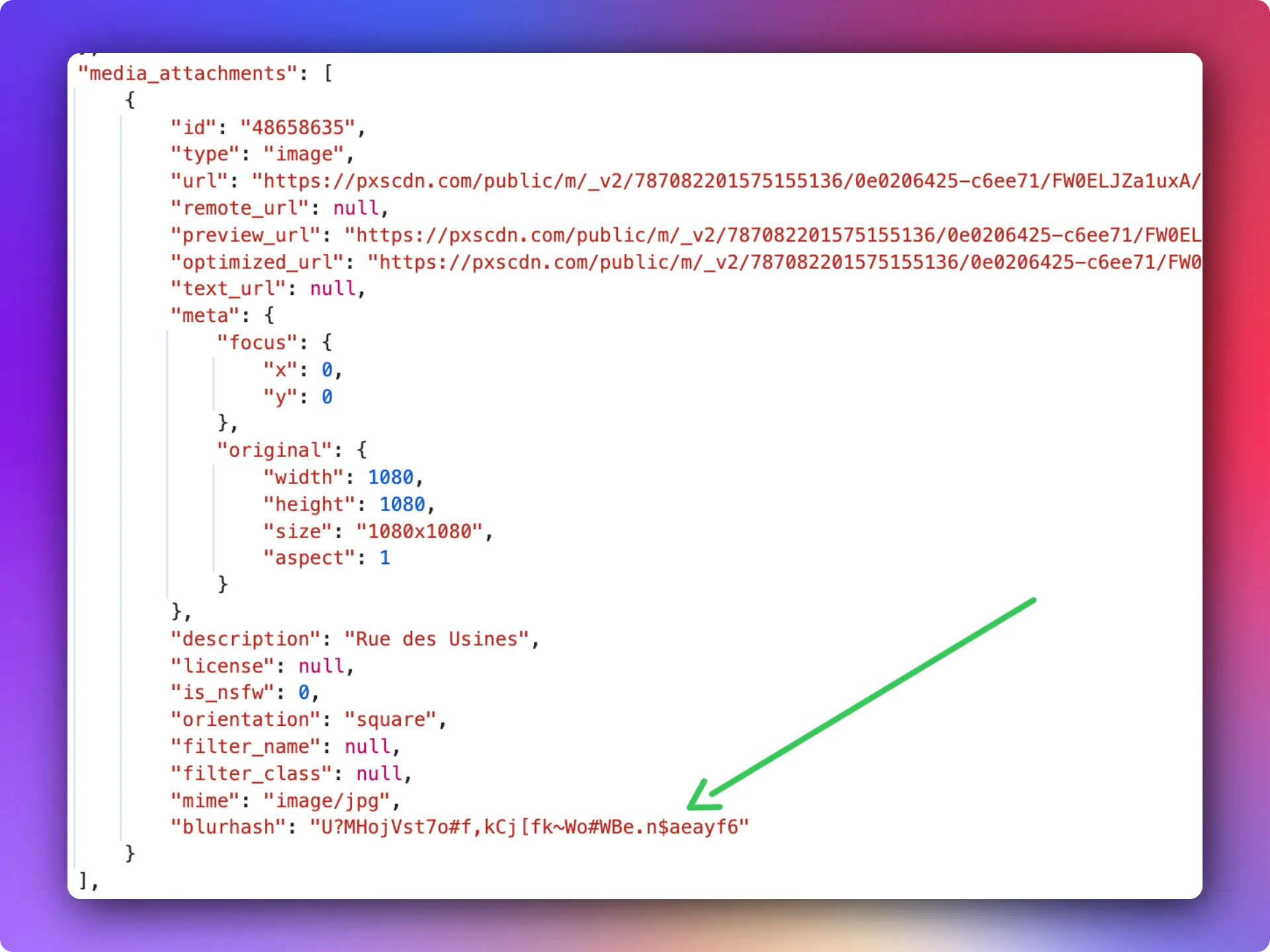
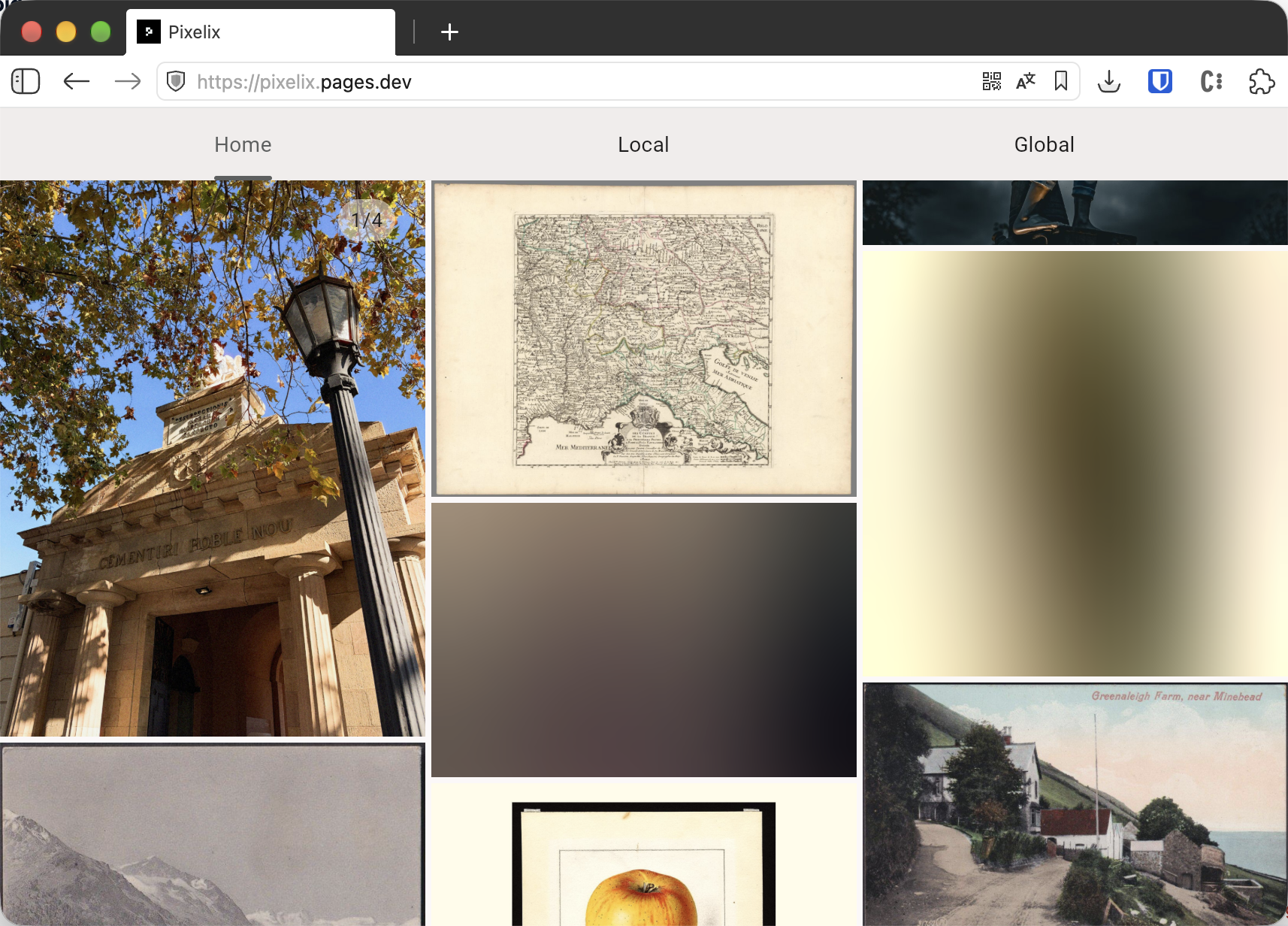
Clearly, decoding a byte array and turning it into a blurred image takes a fair amount of computation. So let’s move this work to Dispatchers.Default.
internal object BlurHashDecoder {
    suspend fun decode(
        blurHash: String?,
        width: Int? = 30,
        height: Int? = 60,
        punch: Float = 1f
    ): ImageBitmap? = withContext(Dispatchers.Default) {
        if (blurHash == null || width == null || height == null || blurHash.length < 6) {
            return@withContext null
        }
        require(width > 0) { "Width must be greater than zero" }
        require(height > 0) { "Height must be greater than zero" }

        val numCompEnc = decode83(blurHash, 0, 1)
        val numCompX = (numCompEnc % 9) + 1
        val numCompY = (numCompEnc / 9) + 1
        if (blurHash.length != 4 + 2 * numCompX * numCompY) {
            return@withContext null
        }
        val maxAcEnc = decode83(blurHash, 1, 2)
        val maxAc = (maxAcEnc + 1) / 166f
        val colors = Array(numCompX * numCompY) { i ->
            if (i == 0) {
                val colorEnc = decode83(blurHash, 2, 6)
                decodeDc(colorEnc)
            } else {
                val from = 4 + i * 2
                val colorEnc = decode83(blurHash, from, from + 2)
                decodeAc(colorEnc, maxAc * punch)
            }
        }
        composeBitmap(width, height, numCompX, numCompY, colors)
    }
}
You can find the full code in the BlurHashDecoder implementation.
In the ideal case, everything works perfectly!
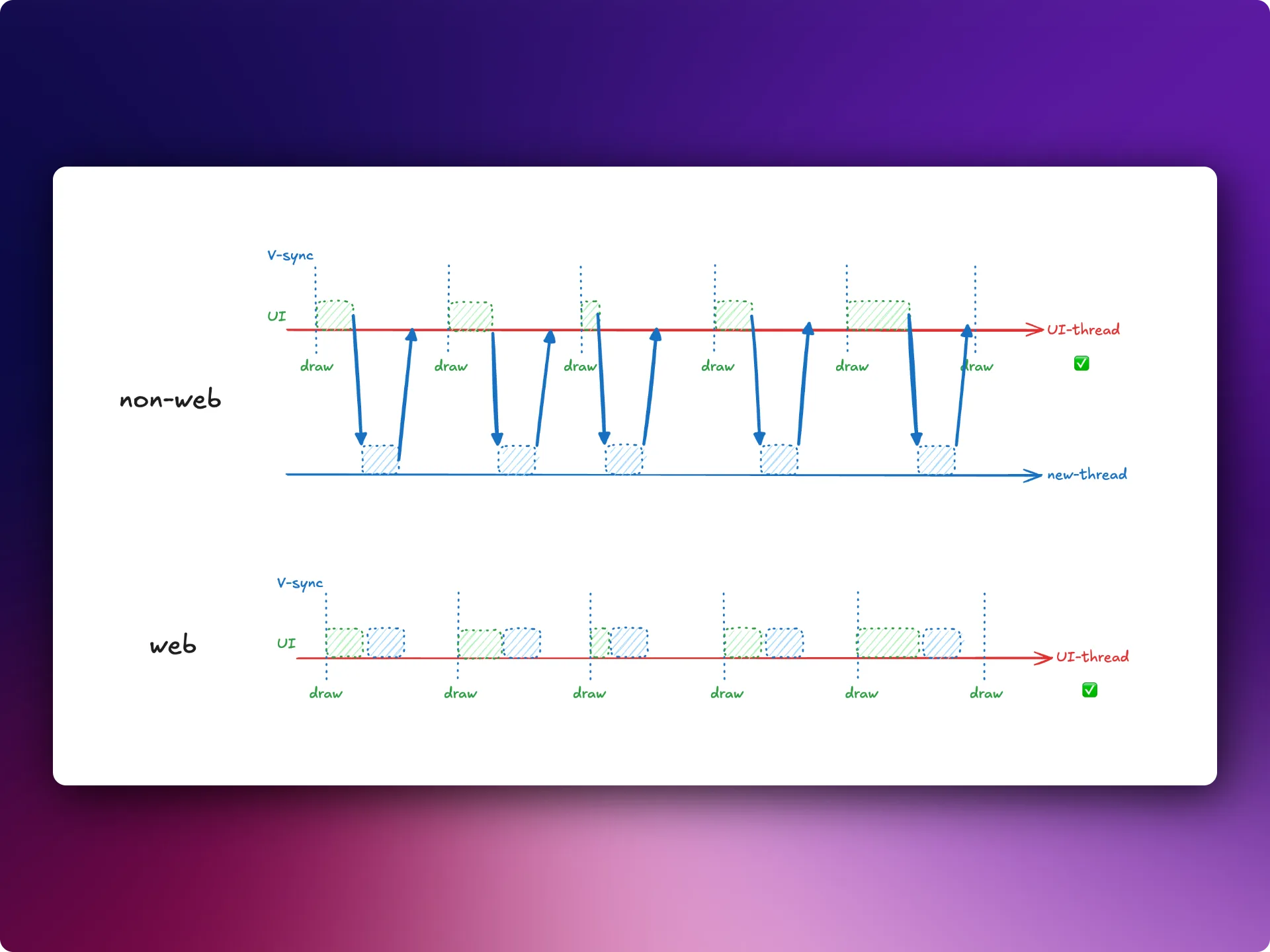
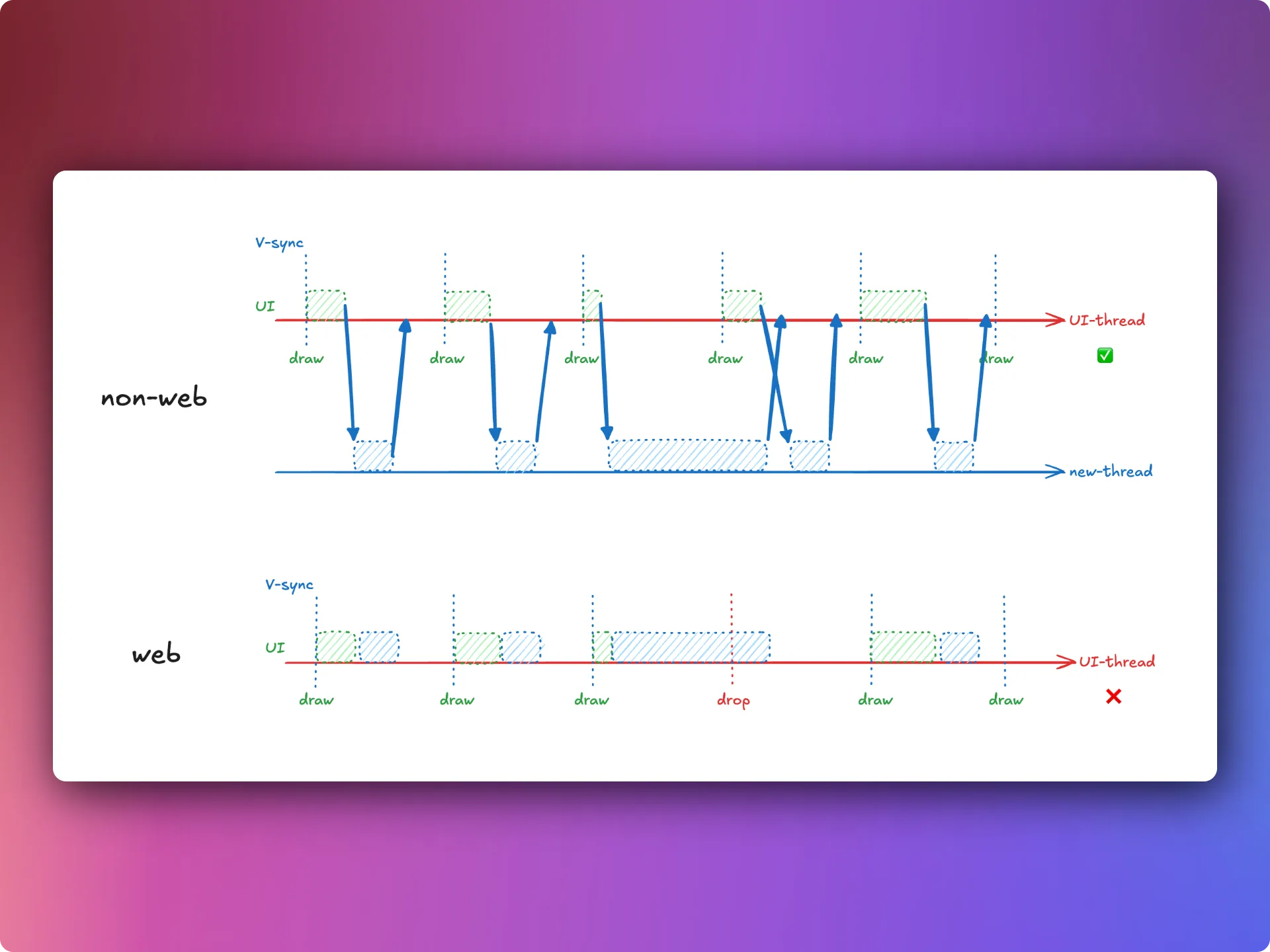
But what if calculating the blur takes more work than expected?
Then the web version will start dropping frames.
Split the work with yield()
#
Important: this is a key part of designing and writing Kotlin code that will run on a web target. You cannot have sections of logic that run for a long time without interruption. You need to let other tasks take a turn and do their work too. This is exactly what the yield() function in kotlinx.coroutines is for.
Let’s imagine we managed to split the blur calculation into three sequential parts.
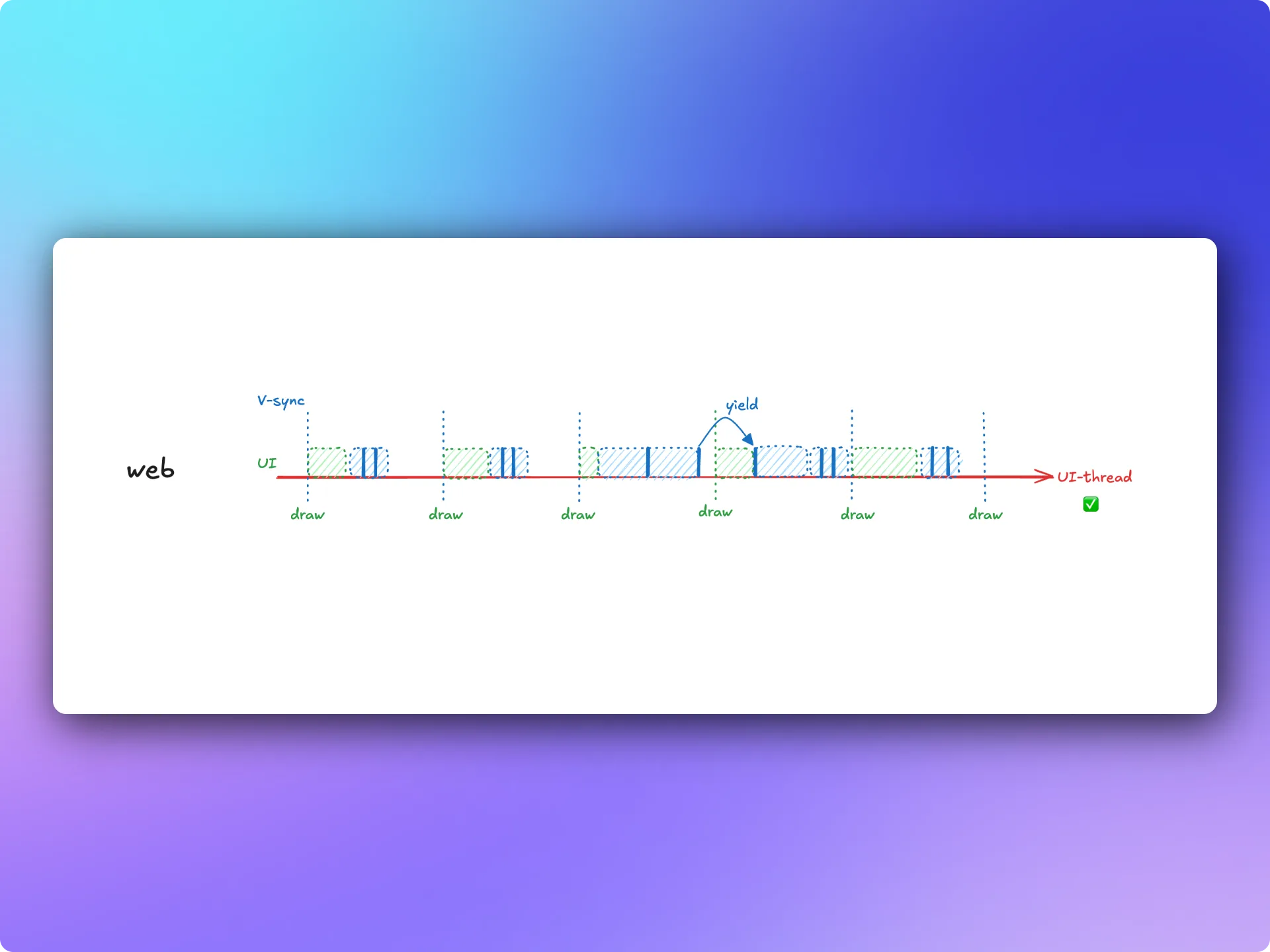
This way, we keep the UI fast and responsive while still doing the heavy work whenever resources are available.
Library authors, remember: you need to support the web target deliberately, taking its limitations into account.
Web Workers #
But what if you use a third-party library — in this case, for calculating the blur — that does not let you add suspension points inside its logic?
As I mentioned earlier, the browser does not have a threading model with shared memory like the one used on the JVM or native platforms. However, the browser does have Web Workers. They let you run a piece of logic in parallel with the main thread, but with completely isolated memory. This is exactly why we cannot implement kotlinx.coroutines dispatchers using Web Workers.
So, in essence, a Web Worker is an independent component with its own state. You can send it a message with data and receive a message with the result. In software development, this architecture is usually called the actor model.
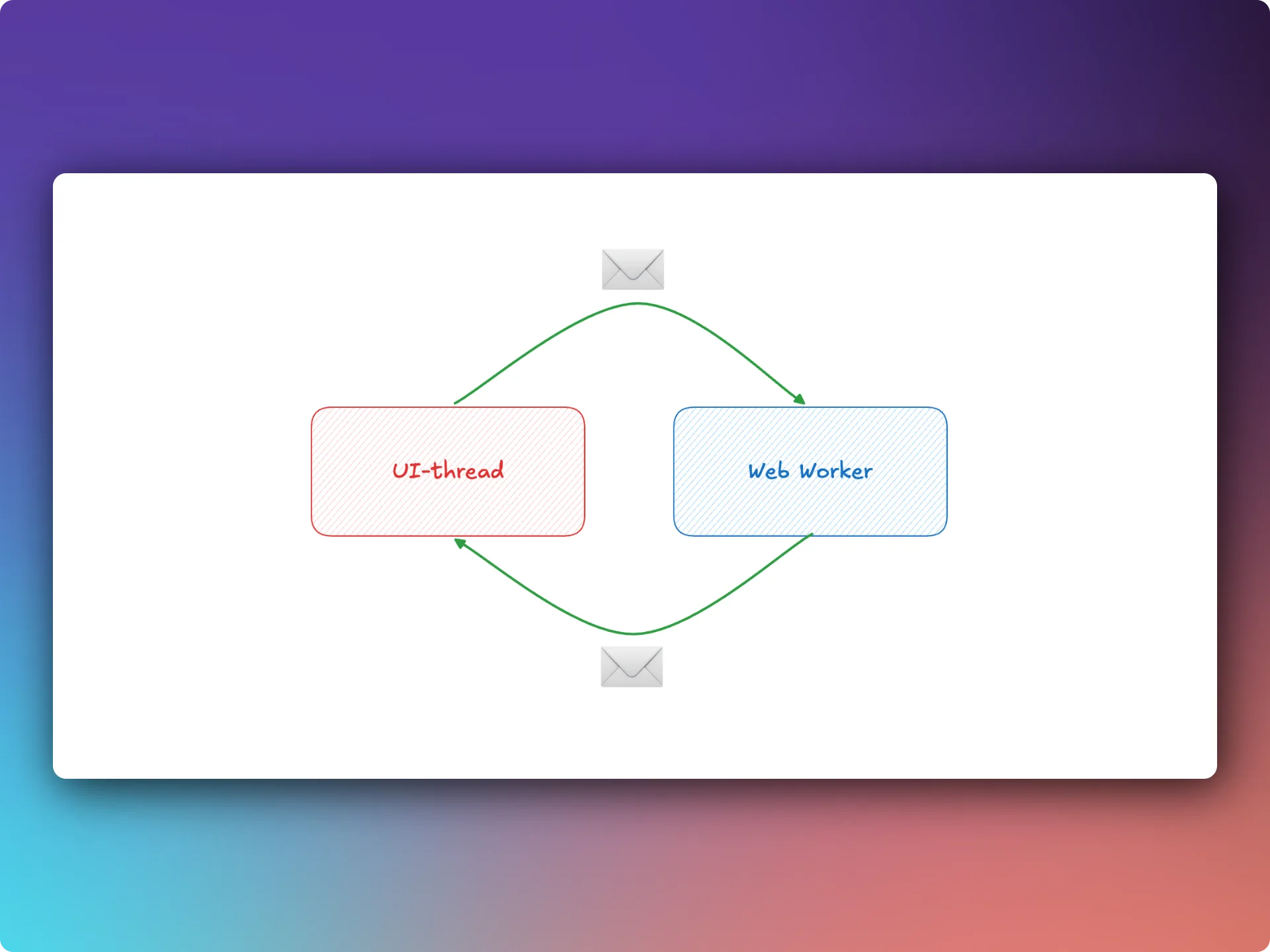
Data is sent to a Web Worker through postMessage():
- Primitives:
string,number,boolean,null. Date,Map,Set,ArrayBuffer, arrays, and other supported objects are copied when sent in a message using the structured clone mechanism.
Instead of copying objects, you can use ownership transfer (transferable objects). After transferring ownership, you can no longer use the object from the UI thread. Once the Web Worker finishes its work, ownership can be transferred back.
Moving blur decoding to a Web Worker #
Let’s move the blurred preview decoding to a Web Worker.
1. Creating a Web Worker #
We can write Web Worker code in Kotlin and compile it to JavaScript. But this requires a special project setup and a custom way to load the resulting script. Besides, we do not expect the Web Worker code to be large. So for small utility tasks like this, I prefer to keep things simple and use plain JavaScript.
And here is a trick to make loading easier: store the Web Worker code in a Kotlin string!
//language=JavaScript
private const val BLUR_HASH_WORKER_JS = """
self.onmessage = async event => {
  //logic is here
}
"""
2. Loading the Web Worker #
Since the Web Worker code is stored in a string, we will use a different API instead of loading the script from a URL:
private object BlurHashWorker {
    private var worker: Worker? = null

    private fun getWorker(): Worker {
        worker?.let { return it }
        try {
            val url = URL.createObjectURL(workerBlob(BLUR_HASH_WORKER_JS))
            val created = try {
                Worker(url)
            } finally {
                URL.revokeObjectURL(url)
            }
            created.addEventListener("message", { event -> newMessage(event) })
            created.addEventListener("error", { failWorker() })
            created.addEventListener("messageerror", { failWorker() })
            worker = created
            return created
        } catch (error: Exception) {
            // handle error
        }
    }
}

private fun workerBlob(code: String): Blob = js("new Blob([code], { type: 'application/javascript' })")
3. Exchanging messages #
Sending messages #
From the UI thread, we can send a request to decode a blurred preview. We can also cancel the task if the image is already off-screen. So we will need request IDs.
private fun decodeRequest(id: String, hash: String, width: Int, height: Int, punch: Float): JsAny =
    js("({ kind: 'decode', id: id, hash: hash, width: width, height: height, punch: punch })")

private fun cancelRequest(id: String): JsAny = js("({ kind: 'cancel', id: id })")
The Web Worker code will now look like this:
//language=JavaScript
private const val BLUR_HASH_WORKER_JS = """
  const active = new Set();
  const cancelled = new Set();

  async function decode(hash, width, height, punch, id) { ... }

  self.onmessage = async event => {
      const { kind, id, hash, width, height, punch } = event.data;
      if (kind === 'cancel') {
          if (active.has(id)) cancelled.add(id);
          return;
      }
      if (kind !== 'decode') return;
      active.add(id);
      try {
          const buffer = await decode(hash, width, height, punch, id);
          if (!cancelled.has(id)) {
              self.postMessage({ kind: 'result', id, buffer }, buffer ? [buffer] : []);
          }
      } catch (error) {
          if (!cancelled.has(id)) {
              self.postMessage({ kind: 'error', id, message: error.message || String(error) });
          }
      } finally {
          active.delete(id);
          cancelled.delete(id);
      }
  };
"""
Receiving messages #
private external interface BlurHashWorkerMessage : JsAny {
    val id: String
    val kind: String
    val buffer: ArrayBuffer?
    val message: String
}

private object BlurHashWorker {
    private fun newMessage(event: Event) {
        val message = (event as? MessageEvent)?.data?.unsafeCast<BlurHashWorkerMessage>() ?: return
        when (message.kind) {
            "result" -> continuation.resume(message.buffer)
            "error" -> continuation.resumeWithException(
                IllegalStateException("BlurHash worker: ${message.message}")
            )
            else -> continuation.resumeWithException(
                IllegalStateException("Unexpected BlurHash worker response")
            )
        }
    }
}
4. Wrapping it in a suspend function #
private object BlurHashWorker {
    private var nextId = 0L
    private val pending = mutableMapOf<String, CancellableContinuation<ArrayBuffer?>>()

    suspend fun decode(hash: String, width: Int, height: Int, punch: Float): ArrayBuffer? {
        val currentWorker = getWorker()
        return suspendCancellableCoroutine { continuation ->
            val id = (nextId++).toString()
            pending[id] = continuation
            continuation.invokeOnCancellation {
                if (pending.remove(id) != null) {
                    // A failed/terminated worker must not turn cancellation into an exception.
                    runCatching { currentWorker.postMessage(cancelRequest(id)) }
                }
            }
            if (continuation.isActive) {
                try {
                    currentWorker.postMessage(decodeRequest(id, hash, width, height, punch))
                } catch (error: Exception) {
                    pending.remove(id)
                    continuation.resumeWithException(error)
                }
            }
        }
    }
}
Conclusion #
Now the heavy operation runs outside the UI thread and cannot block the user interface!
If you found this approach interesting, you can also take a look at how I moved image processing to a Web Worker in Coil, noticeable improving performance on the web target.
Comments